The Tech Behind This Blog
4 min read752 words
In my last post, I wrote about why I started this blog. This time, I want to write down what I built it with and why I chose each piece.
The stack
This blog runs on the following combination.
Role | What I use |
|---|---|
Building the site | Astro |
Writing and managing posts | microCMS |
Hosting | Cloudflare Workers |
View counts, access counter, and Web claps | Cloudflare Workers and D1 |
Site search | Pagefind |
3D background | Three.js |
Automatic deploys | GitHub Actions |
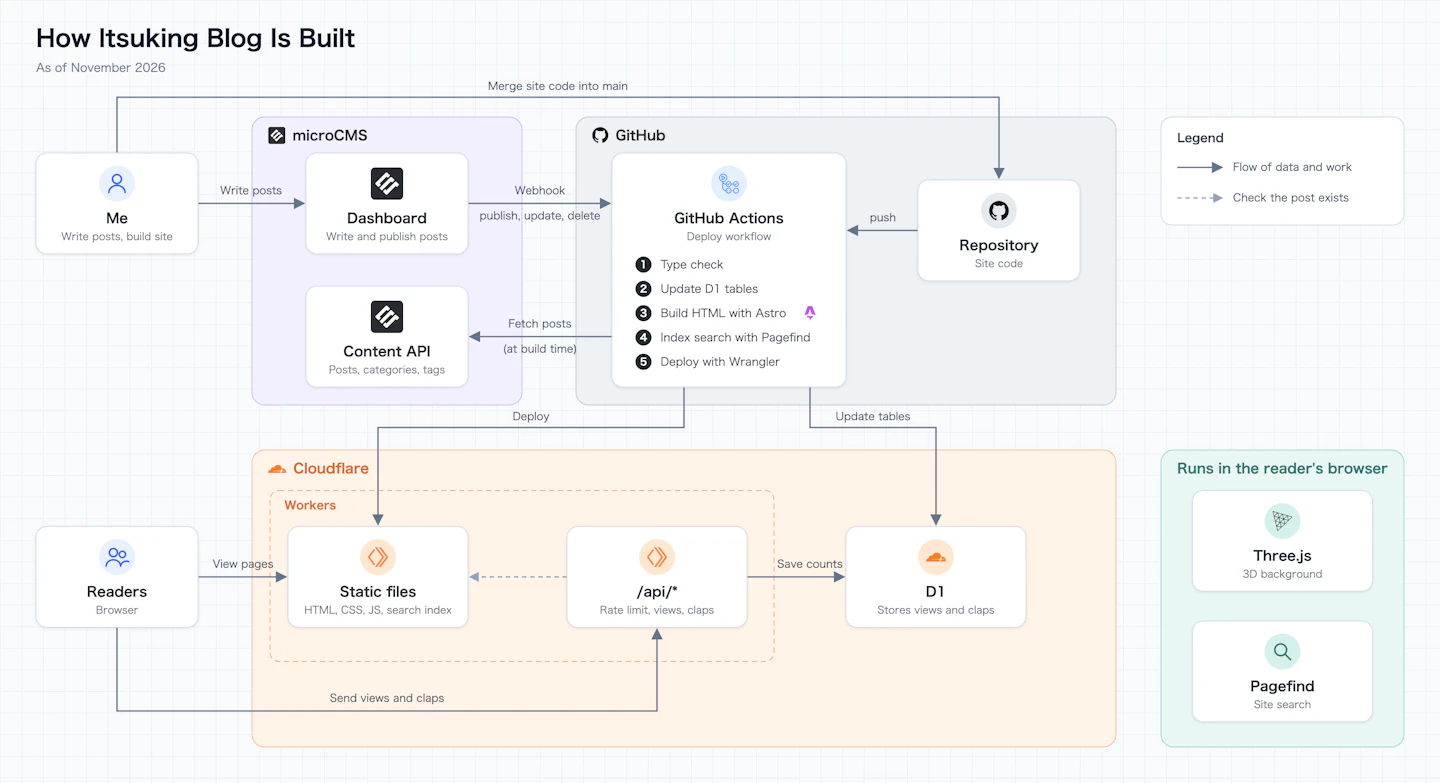
I write posts in the microCMS dashboard. When I publish one, GitHub Actions runs, rebuilds every page as HTML, and deploys the site to Cloudflare Workers.
How I started looking into it
To decide on the stack, I started by asking Claude, "What is a headless CMS?" From there, I asked one question after another: What is Astro? How is microCMS different from a headless CMS? Can it be combined with Cloudflare Workers? That is how I arrived at the current setup.
Why Astro
I first heard about Astro because an engineer I know uses it for their own blog. When I looked into it again for this blog, I decided it was easy to customize and good enough for my blog.
Why SSG
I compared two ways of building pages: SSR, which builds a page on every request, and SSG, which builds all pages ahead of time at build time. For a blog built with Astro, I thought SSG was the right fit.
The deciding factors were that it is good for SEO and that it can show readers the page they want right away. With SSG, every page is already HTML, so the server only has to return it when a request comes in.
Why microCMS
After building the blog, I briefly thought about writing posts as Markdown files and managing them on GitHub. As an engineer, I wanted to keep a record of my posts in Git as well. Committing every time I wrote a post would also fill in my GitHub contribution graph (the green squares on your profile that mark the days you were active).
But I changed my mind. A blog is a place to casually write down how I feel and what I notice. If I had to open an editor, create a file, commit, and push every time I wrote a post, it would add friction before I even started writing. With microCMS, I can just open the dashboard in a browser and start writing.
Why Cloudflare Workers
I learned about Cloudflare Workers through yusukebe (opens in a new tab). Workers is also introduced on yusukebe's blog (opens in a new tab)(in Japanese).
The main reason I chose it is that I didn't want to pay for servers. Since this is a personal blog, I went with a setup that I don't have to spend money on.
Why Pagefind
I use Pagefind for site search. I chose it to make the site easy to search. As I wrote in my last post, it was hard to search my past thoughts on X. That was one of the reasons I started this blog, so I wanted search to be easy here.
Pagefind builds a search index from the body of each post after the build. The search itself runs in the reader's browser, so I can search the full text of posts without setting up a search server. I build separate indexes for Japanese and English.
Why a 2000s blog look
This blog has a sidebar, an access counter, Web claps, and other things that were common on blogs in the 2000s.
At first, I built it with a modern, minimal layout. But it had a lot of empty space and felt lonely. So I brought in the layout of old-school blogs.
The access counter and Web claps are purely for my own motivation. When a post gets a lot of views or claps, it makes me want to keep writing. That said, the numbers mean nothing if someone spams them, so I also added rate limiting.
Trouble with TypeScript 7
One thing I ran into while building the blog was TypeScript 7. As of November 2026, adding TypeScript 7 to an Astro project breaks type checking (astro check). So this blog is still on TypeScript 6.
The same problem is described in an article by akari (opens in a new tab)(in Japanese), which tried TypeScript 7 on an Astro blog. According to that article, when type checking with TypeScript alone, without Astro, version 7 was about five times faster than version 6.
Reading the GitHub issue (opens in a new tab)on Astro, the cause is not only on Astro's side. TypeScript 7 does not yet provide the TypeScript API that Astro's type checking relies on. The issue explains that once TypeScript 7.1 is out, Astro files should also be type-checkable with TypeScript 7. I hope I can upgrade to 7 soon.
Thanks for the clap!